

8555Bet Invite: How to Track and Manage Your Referrals
The Invite tab inside 8555bet is more than a place to grab your referral link. It’s a full dashboard with performance stats, subordinate tracking, and a commission calculator, most of which nobody covers when explaining how referrals work on the app. This guide walks through what each part of it actually does.
Quick facts before you dive in:
| Detail | Info |
|---|---|
| Your two key identifiers | Invitation code and a personal referral link |
| Bonus range | Rs 600 to Rs 2,000 per qualifying referral (full breakdown on our bonus guide) |
| Commission range | 1% to 3%, tiered by valid bet volume, same tiers confirmed across game categories |
| Settlement cycle | Daily |
| Sub-tabs inside Invite | Home, Promotion Sharing, My Data, Performance, Commission, Subordinate Information, Subordinate Betting, Subordinate Finance, Subordinate Claim, Create Sub-Level, Commission Rate |
Getting Your Invitation Link and Code
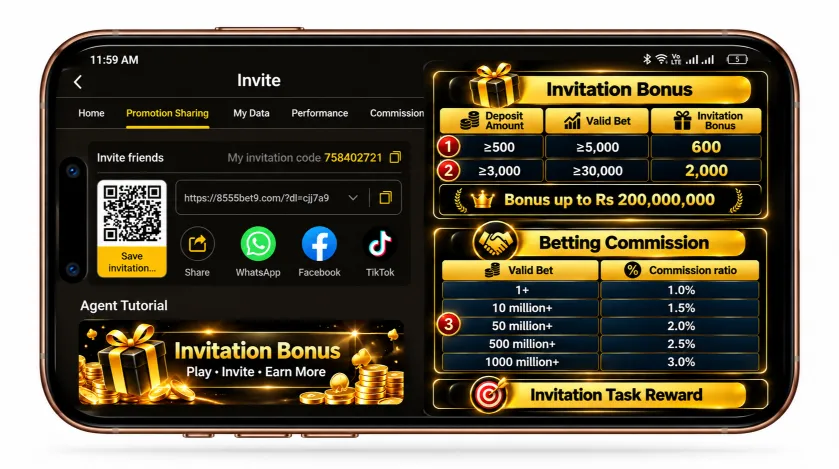
The Home tab under Invite is where you’ll find your personal invitation code, a QR code, and a shareable link, along with direct share buttons for WhatsApp, Facebook, and TikTok. This same tab also shows a live scrolling feed of other agents’ daily commission totals, which functions as social proof more than useful personal data.
The Bonus Structure, Briefly
The Promotion Sharing tab lays out the same tiered structure we’ve verified elsewhere: an invitation bonus of Rs 600 for referrals depositing Rs 500+ and betting Rs 5,000+, rising to Rs 2,000 at higher deposit and betting thresholds, plus a betting commission that climbs from 1.0% to 3.0% as your referrals’ combined valid bets grow. Task rewards for sharing (daily, weekly, monthly) are listed here too. You can see how these bonuses show up as in-app promo banners for the full list of active offers. We’ve covered the full numbers on our dedicated bonus page, so this article focuses on what’s actually new: how to track it.
Tracking Your Performance: The My Data Tab
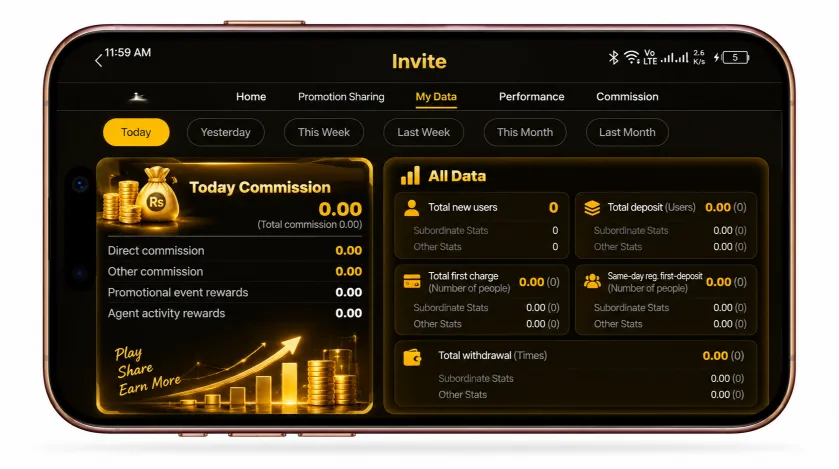
This is where the dashboard gets genuinely useful. My Data breaks your referral activity down by date range (today, yesterday, this week, last week, this month) into three groups:
Commission Earned
direct commission, other commission, promotional event rewards, and agent activity rewards, shown separately rather than as one lump sum.
All Data
total new users you’ve referred, their combined deposits, first charges, same-day deposits, withdrawals, claimed rewards, valid bets, and win/loss figures.
Total data including subordinates
A rollup of everyone under you, plus your own total earnings broken into direct commission, other commission, commission sent, and what’s unclaimed versus already claimed.
If you’re trying to understand whether your referral activity is actually paying off, this tab is more informative than the Home tab’s headline numbers.
Subordinate Tracking Tabs
Four separate tabs let you drill into individual referrals rather than just aggregate totals:
| Tab | What It Shows |
|---|---|
| Subordinate Information | Each referral’s ID, online/offline status, deposit amount, valid bets, account status, and login date |
| Subordinate Betting | Betting activity per subordinate, sortable by valid bet amount |
| Subordinate Finance | Financial activity per subordinate, sortable by recharge |
| Subordinate Claim | Claim history per subordinate |
All four support searching by Member ID directly, which is useful once you have more than a handful of referrals to keep track of. In a fresh account with no referral activity yet, these tabs simply show “No content yet,” which is expected rather than a sign of a problem.
The Commission Rate Calculator
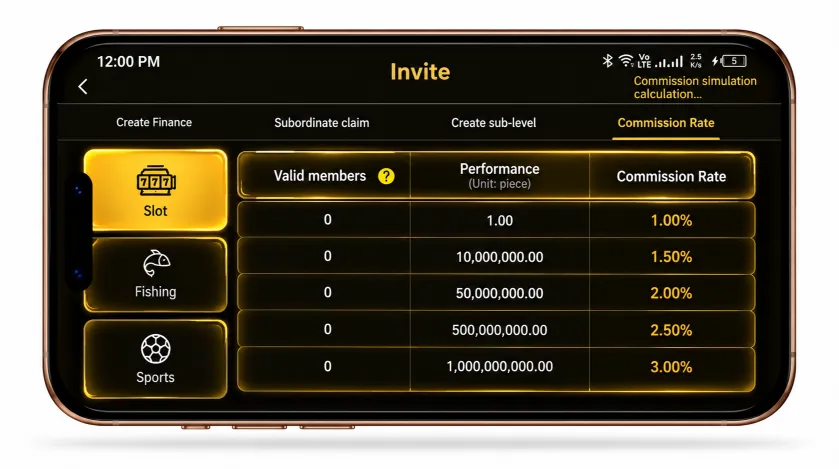
This tab shows the same tiered commission structure (1.0% up to 3.0%) broken out by category, with Slot, Fishing, and Sports each getting their own tab showing identical tier thresholds: the rate climbs at 10 million, 50 million, 500 million, and 1,000 million in cumulative performance. It also displays a “Valid members” column, currently showing 0 across every tier until you have referrals generating activity. The label at the top calls this a “commission simulation calculator,” suggesting it’s meant to help you estimate earnings at different referral volumes rather than just display fixed information.
Know What Your Referral Link Is Worth
You’ve got your referral link — now see its real earning potential. Use our Referral Commission Calculator to check your tier, monthly commission, and invitation bonuses in PKR.
Creating Direct Subordinates
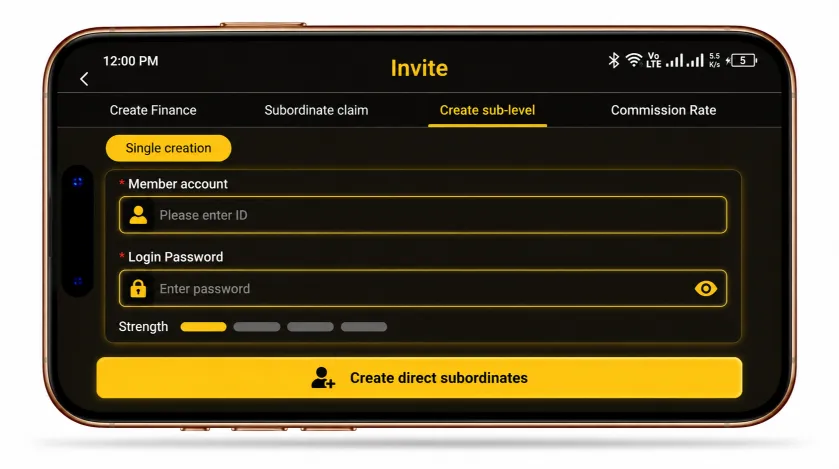
One feature worth flagging clearly: the Create Sub-Level tab lets you directly create an account under your own referral tree by entering a member account ID and setting a password, rather than only growing your network through people clicking your link and signing up themselves. This is a legitimate agent tool on platforms structured this way, but it only makes sense to use for real people who’ve agreed to have an account set up on their behalf. Creating accounts without a real person behind them to inflate your own subordinate count would be account manipulation, not legitimate referral growth, and platforms like this typically reserve the right to void commission earned that way.
conclusion
Most people check the Home tab once and never look at the rest of the Invite system. The My Data and Subordinate tabs are where you’d actually catch a referral who deposited but never got credited properly, or confirm whether your commission is climbing the way the tier table suggests it should. Worth a periodic look rather than a one-time setup.